Displaying Shopify Discounts the Right Way When Order Data Matters
For many Shopify stores, promotional pricing is straightforward: the product price is reduced, or a compare-at price is used to show a sale price.
But that approach does not work for every business.
In some ecommerce implementations, especially when orders flow into a downstream system, the business needs the product line item to retain its original unit price while the discount is recorded separately in the order discount field.
For example, a product normally priced at $15 may need to display to shoppers as:
$15 $10
But in checkout and order data, the structure needs to remain:
- Product price: $15
- Discount: -$5
- Tax and shipping calculated normally
- Order total reflecting the discount
That distinction matters because the integration expects the order line to show the full unit price and extended price, while the promotional savings are passed separately as a discount.
The challenge: shoppers still expect to see the discounted price before checkout, including on the product detail page and product listing pages.
To support this requirement, we implemented a Shopify discount display customization using Shopify Flow, custom metafields, product tagging, and theme logic.
The Business Requirement
The customer needed auto-applied Shopify discounts to behave normally in cart and checkout, while also showing discounted pricing on the storefront before the customer added the item to cart.
The expected shopper experience was:
- On the product detail page, eligible products show the regular price as a strikethrough and the reduced price as the current display price.
- On product listing pages, eligible products show the same strikethrough and reduced price display.
- Non-eligible products continue to show standard pricing only.
- If discount data is missing, invalid, or unavailable, the storefront falls back to standard pricing.
- In cart and checkout, the discount appears as an actual Shopify discount, not as a reduced product price.
- In order data, the line item retains the original unit price and extended price, while the discount is passed separately.
This allowed the storefront to communicate the promotional price clearly to shoppers without changing the underlying product price structure required by the order integration.
Why Standard Sale Pricing Was Not Enough
A standard sale price or compare-at price can be useful when the product’s visible price and transactional price are meant to be the same.
In this case, the discount needed to remain a discount.
That meant the product could not simply be repriced from $15 to $10. The order needed to show the product line as $15, with the $5 savings represented in the discount field.
That structure matters for systems that consume Shopify order data and expect a separation between:
- Unit price
- Extended line price
- Discounts
- Tax
- Shipping
- Order total
The storefront display needed to mirror the promotion, but the source of truth for the actual discount still needed to be Shopify’s cart and checkout discount logic.
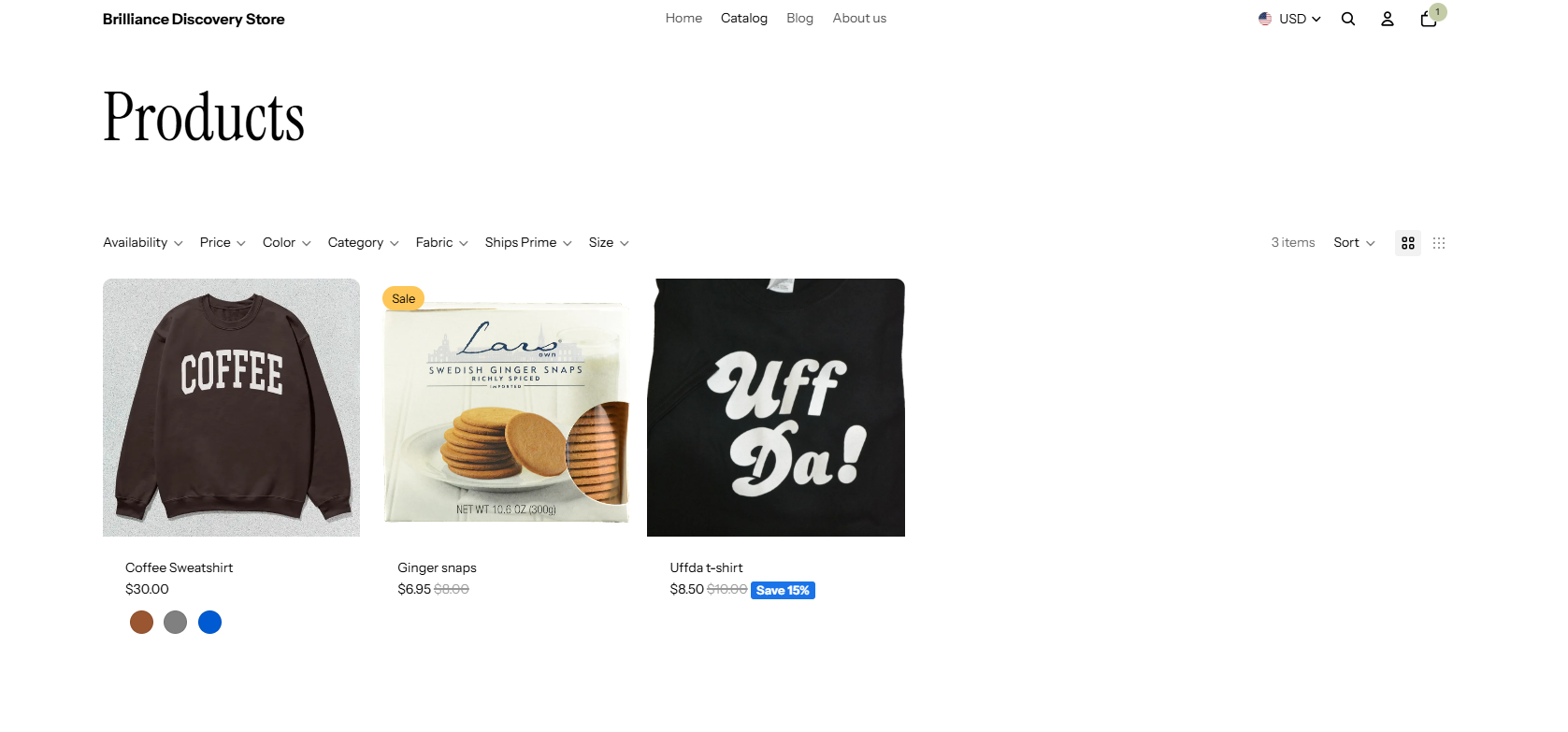
Figure 1: Product Listing with Discounted Price
The Implementation Approach
The solution used Shopify Flow to keep discount display data in sync with products, variants, and collections.
When an admin created or updated an auto-applied product, collection, or variant discount, Shopify Flow trigger extension logic detected the change and updated the related storefront data.
For products and variants, the implementation:
- Detected the new or updated discount.
- Iterated through each eligible product or variant.
- Wrote discount information to a custom metafield.
- Wrote the discount ID to a custom metafield.
- Added a product tag using the format discount-{{discount ID}} so products could be queried or filtered by discount.
For collection-based discounts, the implementation wrote the discount information to collection metafields. Collection discounts were handled at the collection level rather than by applying product tags to the collection.
This gave the theme a reliable place to look for discount display data without changing the actual product price.
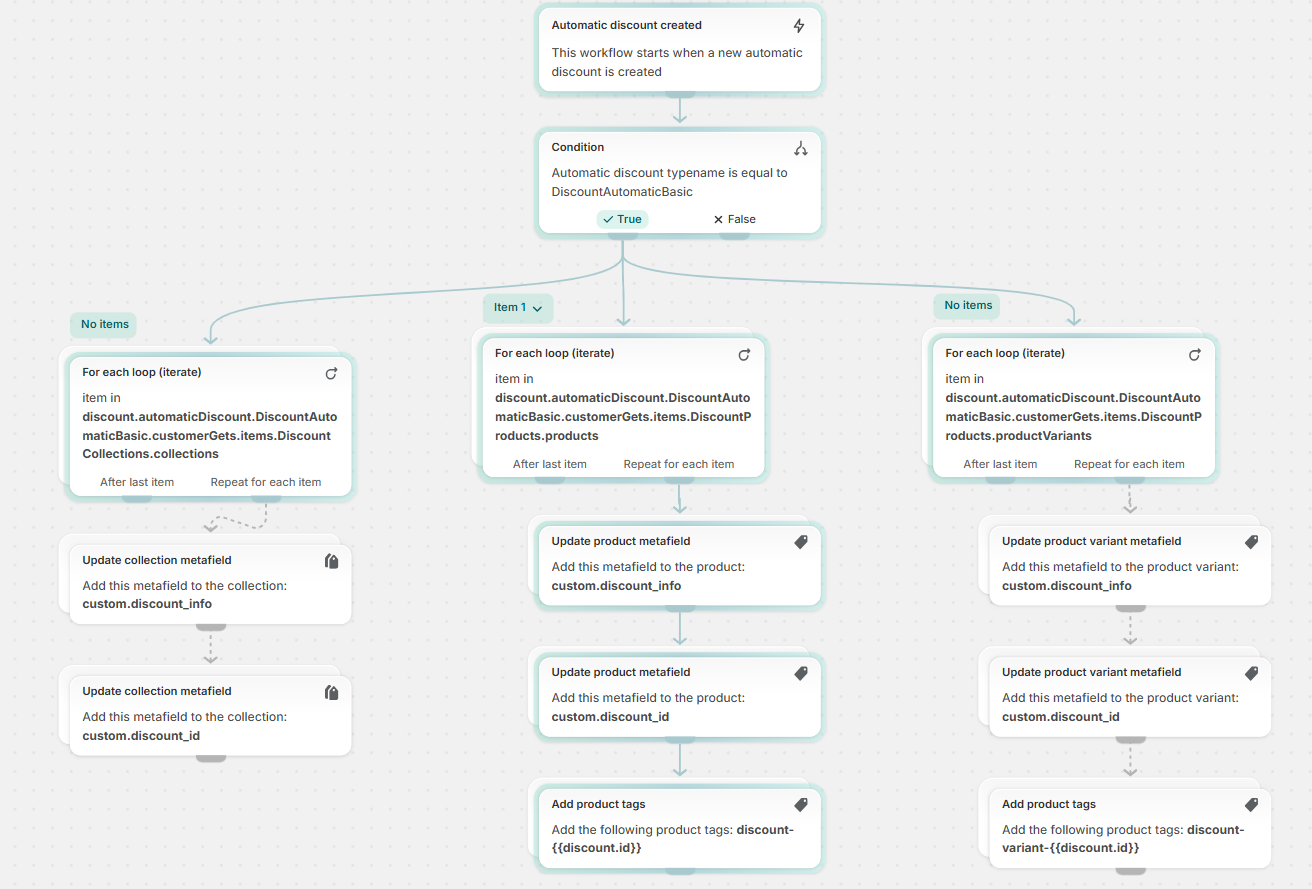
Figure 2: Automatic Discount Created Shopify Flow
How the Storefront Display Works
On the product detail page and product listing pages, the theme reads the discount data from metafields.
If valid discount data exists, the theme calculates the discounted display price and renders the original price as a strikethrough with the calculated reduced price beside it.
For example:
$15 $10
If no eligible discount data exists, the product displays its standard price.
If the metafield is missing, invalid, or unavailable, the theme does not attempt to guess the discount. It falls back to standard pricing to avoid showing an incorrect sale price.
That fallback behavior is important because discount displays must be accurate. Showing the wrong discounted price on a product page can create customer confusion and support issues if checkout calculates a different total.
Cart and Checkout Still Use Shopify Discount Logic
The storefront display customization does not replace Shopify’s cart and checkout discount behavior.
When the shopper adds an eligible product to cart, Shopify’s auto-applied discount logic still applies the discount to the eligible item. The cart and checkout display the discount in the discount area, and the subtotal reflects the eligible promotional savings.
If the cart contains both discounted and non-discounted items, the discount applies only to the eligible items.
If eligibility changes, such as when the shopper removes the eligible product from the cart, the discount is removed and the totals update accordingly.
This approach keeps the shopper-facing merchandising experience aligned with Shopify’s checkout behavior while preserving the order data structure required by the integration.
Handling Discount Removal
The implementation also accounted for discounts being disabled or removed.
When an auto-applied product, collect-**ion, or variant discount is removed, the related discount display data must also be removed. Otherwise, the storefront could continue showing a strikethrough price for a promotion that no longer applies.
The delete flow removes the discount metafield data so previously eligible products return to standard pricing.
That cleanup step is essential. Without it, product pages could display outdated promotional pricing even though the cart and checkout no longer apply the discount.
Important Limitations
This type of customization works well when discount rules are controlled and predictable. However, there are important limitations to understand.
The biggest limitation is overlapping discounts.
If a product has more than one applicable discount, Shopify may apply the best available discount in cart and checkout. The storefront display, however, is based on the discount data written to the product, variant, or collection metafield.
That means the PDP or PLP display may not always match the final cart or checkout discount if multiple discounts apply to the same product and the metafield reflects a discount that is not the one Shopify ultimately applies.
For example, if a product is eligible for both a product-level discount and a collection-level discount, Shopify may apply the better discount in checkout. If the storefront metafield points to the other discount, the displayed sale price could be different from the final checkout discount.
The implementation can reduce this risk, but it is important to recognize the limitation during planning.
Potential mitigations include:
- Sending an alert when an item already has a discount applied.
- Creating a scheduled flow that periodically reassigns discount metafields.
- Establishing business rules to avoid overlapping discounts on the same product or variant.
- Testing product, variant, and collection discount combinations before launch.
There are also processing limits to consider. The delete flow can process up to 100 directly assigned products or variants per discount. It can also process up to 100 collections per discount. If more than 100 collections need to be supported, the flow logic can be split into smaller groups using queries.
Collection-based discounts are handled differently because the discount information is stored on the collection, rather than requiring every product or variant in the collection to be retrieved and updated individually.
When This Approach Makes Sense
This type of Shopify discount display customization can be a good fit when:
- The business wants shoppers to see sale-style pricing on PDP and PLP pages.
- Discounts need to remain true Shopify discounts in cart and checkout.
- Product line item prices must remain unchanged for downstream order integrations.
- The integration expects discounts to be passed separately from unit price.
- Admin users need to manage promotions through Shopify discount tools.
- The storefront needs to avoid displaying incorrect pricing when discount data is unavailable.
It is especially useful when merchandising, checkout behavior, and order integration requirements need to work together.
Key Takeaway
Shopify’s standard discount behavior may work well in cart and checkout, but some businesses need more control over how those discounts appear before checkout.
By using Shopify Flow, metafields, product tags, and theme logic, it is possible to display automatic discounts on PDP and PLP pages while preserving the correct order structure for downstream systems.
The important part is designing the solution with clear fallback behavior, cleanup flows, and a realistic understanding of how overlapping discounts can affect the final checkout price.
For businesses with complex pricing, promotions, or order integrations, this type of customization can help create a better shopper experience without compromising the integrity of the order data.
Need Help With Shopify Pricing or Discount Customizations?
Brilliance Business Solutions helps ecommerce businesses design and implement Shopify customizations that support real-world operational requirements, including pricing displays, discount logic, checkout behavior, and order integrations.
If your Shopify store needs promotional pricing to work a specific way across the storefront, checkout, and backend systems, our team can help evaluate the right approach.